Advanced Technical Information

These sections contain the “under the hood” technical details of the LED Controller system. This information is generally not required for standard setup, configuration, or daily use. Instead, it is provided for the curious, the tinkerers, and those brave souls looking to modify the firmware for their own bespoke projects.
🐉 Here Be Dragons
By entering these pages, you are leaving the “safe zone” of standard consumer setup. I am happy to answer questions about the official firmware, but if you start rewriting the logic or swapping out hardware components, you’re officially the Captain of your own ship. I simply don’t have the bandwidth to troubleshoot custom forks!
System Architecture Overview
The system’s flexibilty allows for different designs related to the sensor(s):
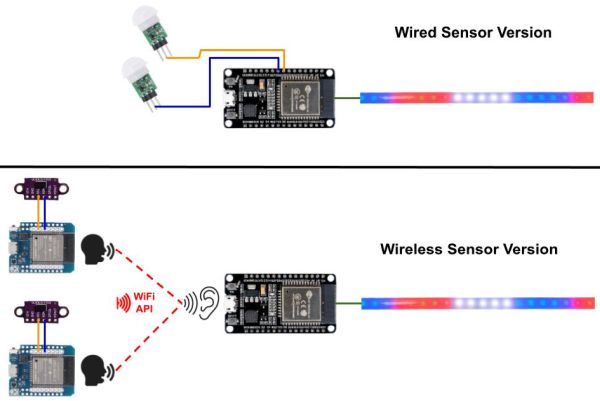
This is not an actual wiring diagram, just an overview of different design options!
The wired design uses a single ESP32 controller and one or two wired sensors (PIR or ToF). The wireless design uses a primary controller connected to the LEDs and then one or more independent wireless sensors. The primary controller uses the same firmware regardless of sensor type. You configure the system for wired or wireless sensors via the embedded web app.
| Wired Version | Wireless Version | |
|---|---|---|
| Suuported Sensor Type | PIR or ToF | PIR, ToF, Others* |
| Number of Sensors | 1 or 2 | 1 or 2+ |
| Mixed Sensor Types | NO | Yes |
| Number of Controllers | 1 | 1 + 1 for each sensor |
| Hub or Cloud Needed | NO | NO |
HTML & UI: To keep modifications straightforward, the entire web application (HTML, CSS, and JavaScript) is stored as embedded strings within a dedicated html.h header file. This means you don’t need to worry about managing SPIFFS assets for the UI—just compile and flash. You also do not need to install a separate app on your computer, tablet or phone to interact with a controller. WiFi is all that is needed.
You can find a full discussion of the different sensor options, including the pros and cons of both, in the Sensor Type and Selection topic.
In This Section
- Firmware and File Structure – A breakdown of the firmware and the specific source files for the Primary and Sensor units.
- Configuration Files – Detailed JSON mappings of the
config.jsonanddiscovery.jsonfiles. - Partitions and Flashing – Memory offsets and partition tables for manual flashing via the Arduino IDE or third-party utilities.
- Effects and Speed – Breakdown of how effects are rendered and how speed is calculated.
- Adding Custom Effects - The code updates needed to add your own custom-defined effects.