Ultimate Bedside Lamp and Clock
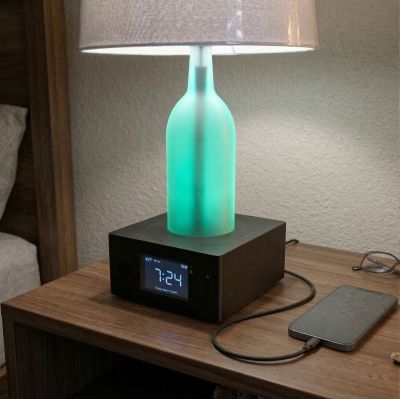
This site contains information regarding the installation, configuration and use of the firmware for this project.
⚠️ Build Instruction Notice
This documentation does not contain build instructions, parts lists, or wiring diagrams. For the physical build details, please refer to the following resources:
- YouTube Overview: Build this PRIVATE Smart Lamp
- Written guide (parts list, wiring diagrams, etc.): Building the Ultimate Bedside Lamp
🤖 AI Transparency Statement
The provided firmware and documentation were created and developed by me (a certified human). While Gemini AI was used to resolve issues with some of the more complex logic, no code was blindly copied and pasted without detailed review. Gemini was also used to style and to provide consistency across these documentation pages. But all content is mine… and developed by a real human!
How this document is organized
The documentation follows a logical setup flow, grouped into the sections seen in the sidebar:
- Welcome: About the project, concepts and terminology.
- Getting Started: Initial firmware flashing, onboarding and interface setup.
- Setting Up the System: Web app overview and setting various system options.
- Alarms: Various methods for setting and responding to alarms, including selecting an alarm sound.
- General System Use: General operation of the system
The remaining topics cover optional and more advanced options, along with a troubleshooting section.
If you are setting up your system for the first time, begin with the Getting Started section.
Hardware Substitutions
The firmware is written for a very specific set of hardware. If you decide to swap the display for a different model you found in a “miscellaneous electronics” drawer, congratulations! You’ve just been promoted to Lead Engineer of your own custom fork.
🛠️ Please Note
While I admire the DIY spirit, I simply don’t have the bandwidth to maintain multiple versions of the firmware. If you venture off-book, you are the Captain of that ship—I’ll be on the shore cheering you on, but I can’t help you navigate the “Why is my screen mirrored and purple?” phase of the journey.
If you use different hardware, you will need to fork this repository and modify the code yourself. See the Modifying the Firmware section for more info.
Opening Issues
- Issues: Reserved strictly for firmware errors or bugs.
- Discussions: For enhancement requests, “how-to” questions or problems that aren’t firmware releated.
Issues opened for feature requests or alternate hardware will be closed without response.