Home Assistant Discovery

If you are a Home Assistant user, you can integrate your bedside lamp to control its features directly from your dashboards or utilize them in complex automations and scripts. The system offers over 25 distinct entities—including lights, sensors, and buttons—without requiring any manual YAML configuration on the Home Assistant side.
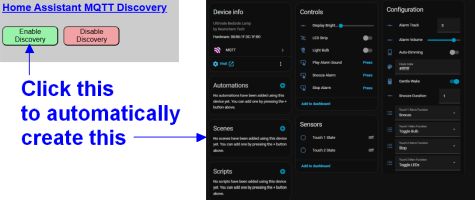
Prerequisites
Before attempting to enable Discovery, ensure your environment meets the following requirements:
- Home Assistant: Version 2026.3 or later is recommended.
- MQTT Broker: A properly configured broker must be available on your network (e.g., the official Home Assistant Mosquitto add-on or a standalone broker).
- MQTT Enabled: You must have successfully Enabled and Configured MQTT in the lamp’s system settings and verified the connection.
Understanding Discovery Naming
The Discovery process creates a new “Device” in Home Assistant using the Discovery Device Name you specify. This name is critical because it determines how your entities appear in the Home Assistant database.
Entity ID Generation
All created entity names are prepended with the device name. The system automatically converts the name to lowercase and replaces spaces with underscores.
Example: Device Name “Bedside Lamp”
light.bedside_lamp_bulblight.bedside_lamp_ledsbinary_sensor.bedside_lamp_touch1state
💡 Note
Once Discovery is enabled, the device name cannot be changed without first removing the Discovery and re-adding it. Consider your naming choice carefully to avoid breaking future dashboards or automations.
In This Section
- Enabling and Disabling Discovery – Step-by-step instructions for the initial setup and removal of the HA integration.
- Editing or Hiding Discovered Entities – Managing entity groups and a complete reference table of all discovered entities.
- Manually Creating MQTT Entities – Advanced instructions for users who prefer manual YAML configuration.