Alarm Options and Settings
Before you begin scheduling alarms, you must configure the global behavior of the alarm system. This ensures that when the time comes, the lamp responds with the correct sound, volume, and snooze logic.
💡 Prerequisite
Be sure you have completed the Setting Up Alarm Sounds section first. If the sound library is not properly mapped to the microSD card, your alarms will be silent.
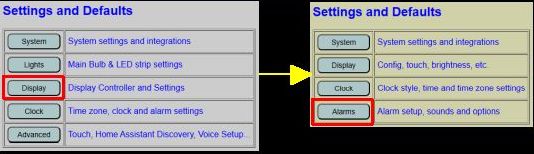
To access these settings, navigate to Display from the primary web page, then select the Alarms button.
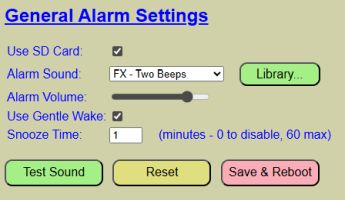
The global alarm settings are located at the top of the page.
Configuration Fields
- Use SD Card: This must be checked to enable the DFPlayer and microSD card. If you are not using audio alarms, unchecking this skips the player initialization.
- Alarm Sound: Select your desired tone from the dropdown list. This list is populated by the first 20 tracks defined in your Sound Library.
- Alarm Volume: Sets the target volume. If using Gentle Wake, this represents the maximum volume the alarm will reach.
- Snooze Time: Set between 0 and 60 minutes. Setting this to 0 disables the snooze function entirely.
💡 Snooze Logic
The snooze timer starts from the moment you trigger the snooze, not from the original alarm time.
- Example: If your alarm sounds at 6:30 AM and you wait until 6:32 AM to hit the snooze (with a 10-minute setting), the alarm will sound again at 6:42 AM.
Gentle Wake Feature
This feature slowly increases the light and volume over approximately one minute. It’s designed to coax you out of sleep rather than startling you into a state of cardiac arrest. It’s the difference between a polite “excuse me, it’s morning” and a digital bucket of cold water. If you find you’re sleeping through the “gentle” part, you might need to increase the final volume or reconsider your late-night scrolling habits.
⚠️ Volume Requirement
The Alarm Volume must be set to at least 50% for Gentle Wake to function. If the volume is set lower than 50%, the alarm will immediately sound at the target volume without a fade-in period.
Maintenance and Testing
- TEST SOUND: Plays the selected track using your current (unsaved) volume and Gentle Wake settings. Use this to verify that your “Gentle Wake” fade is smooth and the final volume is appropriate.
- This can also be used to test your sound mappings. If the track name is mismatched with the actual sound, update the Sound Library.
- STOP TEST: Ends the audio test and returns to the edit interface.
- RESET: Discards any unsaved changes and reloads the last saved defaults from the configuration file.
- SAVE & REBOOT: Commits your global alarm settings to flash memory and restarts the controller to apply them as the new defaults.